
What if your desk isn’t the only reason you feel stiff or uncomfortable by the end of the workday? Chair height, screen position, long periods in one position and repetitive tasks can all contribute to postural stress. A workplace ergonomics chiropractor sydney assessment considers these factors together, rather than relying on generic posture advice.
If you’re unsure whether your chair, desk or daily habits are contributing to discomfort, that uncertainty is understandable. Workstations and work demands differ, so a useful assessment considers your setup, the tasks you perform and how your workday is organised. A professional ergonomic consultation can help identify practical changes that fit your circumstances.
This guide offers a straightforward checklist for reviewing a home or office workstation, along with signs that professional input may be useful. It also explains how workstation adjustments connect with movement and work habits, so you can build a considered plan to support comfort and function at work.
Key Takeaways
- Review your workstation, daily tasks and individual needs together to identify practical changes that may reduce postural stress.
- A workplace ergonomics chiropractor sydney assessment can consider your concerns, health history and work demands alongside workstation observations.
- Choose a self-check, employer-led review or professional consultation according to your circumstances. Each can guide different next steps.
- Note your work patterns and when discomfort appears to make a workstation review more useful.
- Adjusted Chiropractic Studios supports Sydney CBD professionals through professional ergonomic consultation and corporate health training.
What does a workplace ergonomics assessment in Sydney actually cover?
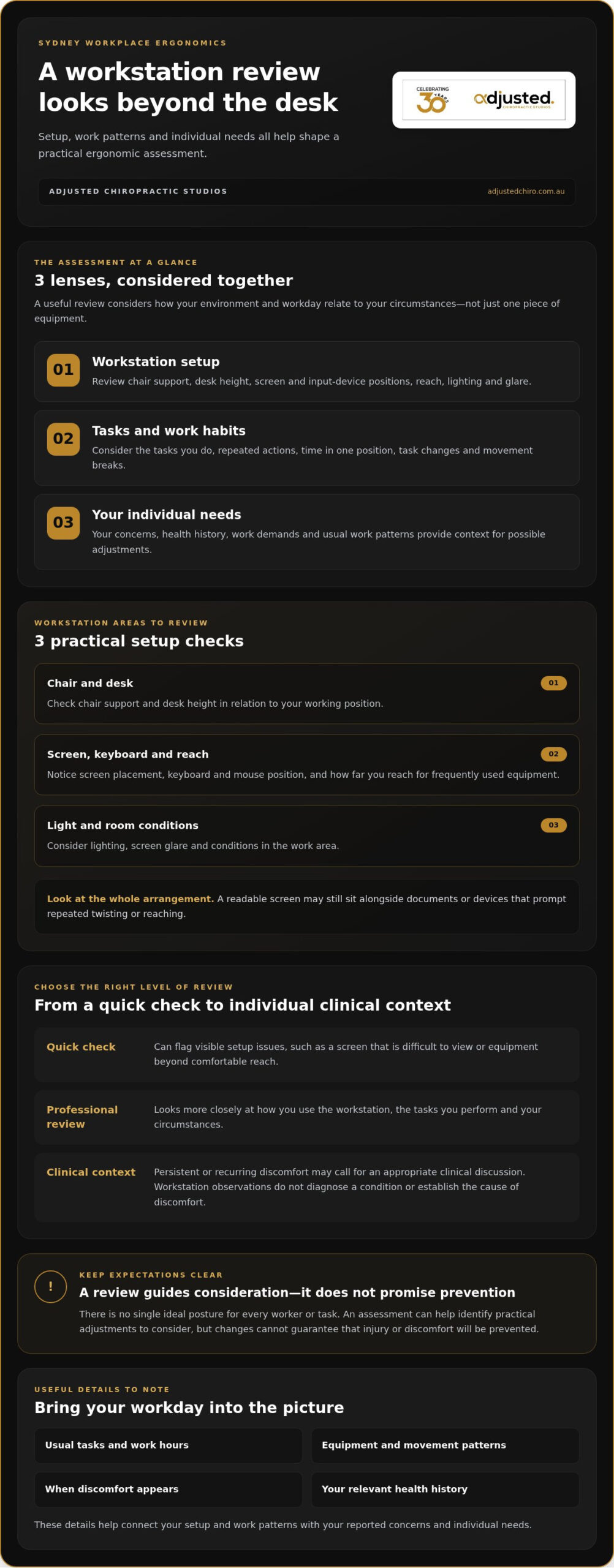
A workplace ergonomics assessment is a structured review of your work setup, tasks and individual needs. It helps identify practical adjustments that may better support the way you work. It isn’t a diagnosis of every possible cause of discomfort, and changes can’t guarantee that injury or discomfort will be prevented. The purpose is to understand how your environment and work habits may contribute to postural stress, then consider sensible next steps.
A quick workstation check can flag visible issues, such as a screen that is difficult to view or equipment placed beyond comfortable reach. A professional consultation looks more closely at how you use the workstation, the tasks you perform and your circumstances. For someone considering a workplace ergonomics chiropractor sydney consultation, that distinction matters: equipment is part of the picture, not the whole assessment.
What parts of a workstation should an assessment review?
The review should consider how each part of your setup works during your usual tasks. This may include:
- Chair support and desk height in relation to your working position.
- Screen placement, keyboard and mouse position, and the reach to frequently used equipment.
- Lighting, screen glare and room conditions that affect the work area.
It’s more useful to assess how the setup works as a whole than to judge a chair or desk in isolation. For example, a screen may be comfortable to read, but documents or devices placed to one side could prompt repeated twisting or reaching. Consider whether the arrangement supports the work you actually do, whether that involves typing, reviewing documents or switching between tasks.
Why assess work habits as well as desk equipment?
Even a well-arranged workstation can involve long periods in one position or repeated movements. These patterns may contribute to postural stress over time. An assessment can explore how often you change tasks or position, when you take movement breaks and whether particular duties involve sustained or repeated actions.
There isn’t one ideal posture for every worker or every task. Comfort and support depend on the person, the work and the environment. A useful assessment considers opportunities for movement and task variation instead of prescribing a fixed position. This reflects the principles of human factors and ergonomics, which consider how people interact with the systems and environments around them.
In practice, a workplace ergonomics chiropractor sydney assessment brings workstation observations and individual concerns into one discussion. It can help you identify adjustments to consider, while recognising that persistent or concerning discomfort may also need an appropriate clinical assessment.
How can a Sydney chiropractor connect ergonomics with individual needs?
A workstation can look well arranged and still feel unsuitable for the person using it. A chiropractor can consider your concerns, health history and work demands together, helping separate potential changes to the work environment from matters that need individual clinical attention. The questions for someone in a desk-based role may differ from those for a worker who moves between computer work, meetings and handling equipment.
Workplace observations add context, but they don’t replace an appropriate clinical assessment. A desk photograph or measurement alone can’t establish the cause of discomfort or diagnose a condition. A workplace ergonomics chiropractor sydney consultation should be considered and guided by evidence-informed care and safety. If a concern needs a different care pathway, clinical judgement can help identify that and support an appropriate referral.
What information helps make an ergonomic consultation individual?
Useful details include your usual tasks, work hours, equipment, movement patterns and when or where you notice discomfort. Your health history can help determine which questions are relevant and which recommendations may suit you. Screen height or chair position is only one part of the context. The aim is to understand how your workday and setup interact with your individual needs, rather than drawing conclusions from measurements alone.
When might a workstation review need clinical context?
If discomfort is persistent or keeps returning, a workstation review may be one useful part of a broader assessment. A clinical discussion can consider your reported symptoms and history alongside the demands of your work, then guide appropriate next steps. Chiropractic assessment isn’t the right pathway for every symptom or situation. Clinical judgement includes recognising when a concern warrants referral or another form of care.
Ergonomic context can help shape a personalised corrective pathway by connecting your work tasks and setup with your reported concerns and individual clinical needs.
Movement and changes of position can also be relevant, particularly if your role involves long periods sitting or standing. Safe Work Australia’s guidance on sitting and standing offers further information on these workplace considerations. A useful assessment applies that general context to your work patterns instead of prescribing one posture for everyone.
At Adjusted Chiropractic Studios, professional ergonomic consultation can be considered alongside individual chiropractic care, with your safety and circumstances at the centre. Read about our professional ergonomic consultation to see how this support can relate to your work.
Self-check or professional ergonomic assessment: which suits your situation?
The right level of support depends on what you’ve noticed and what you want to understand. A self-review can help you spot straightforward setup issues. An employer-led review may look across a team or workplace, while a professional consultation can add individual context when ongoing concerns or specific work demands need closer attention. Each approach has a different purpose.
| Approach | Scope and useful situation | Individual context and likely next step |
|---|---|---|
| Self-review | Checks visible setup factors, such as screen view, reach and whether the chair and desk suit usual tasks. Useful for identifying simple changes. | You decide what to adjust and observe whether the setup feels more workable. It doesn’t assess health concerns or replace clinical advice. |
| Employer-led review | Can consider workstations, tasks or patterns across a team. Useful when a workplace wants to review shared arrangements or support staff. | May identify workplace changes or follow-up questions. Your personal health context may need separate consideration. |
| Professional consultation | Relates workstation observations to your work tasks and reported needs. Useful when concerns persist or self-directed changes haven’t addressed them. | Recommendations depend on the individual assessment. Next steps may include practical setup changes or appropriate clinical advice. |
What can you reasonably check yourself first?
Start with a few practical observations. Can you view your screen without repeatedly leaning forward? Are frequently used items within comfortable reach? Do your chair and desk allow a workable position for your usual tasks? Notice when discomfort or fatigue appears and what you were doing at the time. OSHA’s workstation evaluation checklist offers a structured set of prompts. It’s a US resource, so use it as a general reference rather than Australian guidance.
When can professional input provide more individual guidance?
If you’ve tried reasonable setup changes but discomfort keeps returning, professional input can help relate your observations to your work demands and reported concerns. A workplace ergonomics chiropractor sydney consultation considers that context, while recognising that desk-related discomfort doesn’t automatically mean chiropractic treatment is needed. The focus is on appropriate, individualised recommendations, not a guaranteed result.
A self-check is a useful starting point for visible issues, but it can’t diagnose a condition or determine the cause of symptoms. If your concern is ongoing, severe or changing, seek appropriate clinical advice rather than relying on workstation adjustments alone.
Sydney home-office and workplace ergonomics checklist: what should you review?
Use this sequence to review a home office or workplace in the Sydney CBD. Consider how the setup supports your normal tasks, then note which changes seem practical. This checklist can help you notice patterns, but it isn’t a diagnosis or individual treatment plan.
- Check your seating and desk. Is the chair stable, and can you sit comfortably while completing your usual tasks? Check that the desk gives you practical access to your keyboard, mouse and work materials without awkward reaching.
- Review the screen. Can you view it clearly while working, or do you regularly lean forward, tilt your head or shift position to see? Consider whether the screen position suits the task, especially if you switch between a monitor and a laptop.
- Arrange frequently used equipment. Keep your keyboard, mouse and commonly used items within practical reach. Notice whether you repeatedly twist or stretch to pick up documents, a phone or other work tools.
- Look at lighting and glare. Check whether reflections or poor lighting make the screen or paperwork harder to see. Try a practical adjustment to the light source or screen position, then note whether it makes everyday work easier.
- Observe a typical work period. For a short observation period, record the tasks you do, meeting patterns, changes between equipment and long stretches in one position. Note when discomfort or fatigue appears and what you were doing at the time.
- Consider movement and task variation. Notice whether your day includes opportunities to change position or vary tasks. If long uninterrupted periods are common, identify a manageable point in your routine to stand, move or switch activities where the work allows.
- Make one practical change at a time. Adjust an item or routine that seems relevant, then see how the setup feels during normal work. Keeping track of what you changed can help you decide whether further review would be useful.
Small adjustments can make a workstation more workable, but they won’t explain every cause of discomfort or guarantee a particular outcome. If your concerns continue despite reasonable changes, a workplace ergonomics chiropractor sydney consultation can help relate your observations to your individual needs and work demands.
For further guidance on workplace routines and posture, read our Sydney workplace posture guide. If an individual review would help, explore our professional ergonomic consultation.
How Adjusted Chiropractic Studios supports workplace ergonomics in Sydney
Workplace concerns can involve more than desk height or chair support. Adjusted Chiropractic Studios provides professional ergonomic consultation and corporate health training to help Sydney workers and employers consider workstation setup, movement and everyday work habits. Guidance is practical and personalised, shaped around workplace needs rather than a single set of posture rules.
Serving Sydney CBD professionals since 1994, the studio has presented corporate health talks for organisations including Macquarie Bank, St George Bank and Aurecon. These examples reflect experience speaking with workplace teams, not endorsements by those organisations. For an individual worker, an ergonomic review can connect observations about setup and tasks with personal concerns. For an employer, training can support shared understanding of work habits and spinal health across a team.
What Sydney employers can expect from a workplace-focused approach
Corporate health training can cover practical topics such as workstation awareness, posture, movement and ways to vary tasks during the workday. The aim is to make guidance relevant to the work people actually do, whether their day involves extended computer use, frequent meetings or changing tasks. Sustainable routines are more likely to fit daily work when they account for both team practices and individual needs.
Professional ergonomic consultation adds a closer look at the relationship between work demands, a person’s setup and their reported concerns. It doesn’t mean every desk-related issue requires chiropractic treatment. If someone also has persistent discomfort, individual clinical context may be relevant alongside workplace observations. For readers considering a workplace ergonomics chiropractor sydney consultation, the focus is a considered assessment and appropriate next steps, not a generic adjustment or promise of a particular result.
Employers and workers can start by identifying their workplace health goals, the tasks involved and any concerns they’ve observed. Explore workplace health support in Sydney to begin a conversation about a practical approach for your circumstances. We are here to listen and help you consider the next step.
How to take the next step with Adjusted Chiropractic Studios
The studio is on Hunter Street, opposite Martin Place Metro station, near Wynyard and Barangaroo. Read more about the Sydney corporate health programme for workplace-focused ideas, or explore adult chiropractic care in Sydney CBD for information on individual spinal health support.
Whether you’re reviewing one workstation or considering support for a team, start with the questions that matter in your work setting. A clear conversation can help identify relevant needs and guide thoughtful next steps, without assuming the same approach will suit everyone.
Build better support into your working day
A useful workstation review looks beyond the chair and screen. Check how your setup supports your usual tasks, notice when discomfort appears, and consider movement and work patterns alongside equipment. A self-check can reveal practical adjustments, while ongoing concerns may call for individual clinical advice. The right next step depends on your needs, not a one-size-fits-all posture rule.
If you’re considering a workplace ergonomics chiropractor sydney assessment, Adjusted Chiropractic Studios offers professional ergonomic consultation and corporate health training shaped around real work demands. The studio has served Sydney CBD professionals since 1994, with over 30 years of clinical experience, and has presented corporate health talks for Macquarie Bank, St George Bank and Aurecon. It’s located on Hunter Street opposite Martin Place Metro station.
Whether you’re reviewing your own home office or looking at workplace support for a team, a considered conversation can help clarify practical next steps. Explore workplace health support in Sydney and take a steady, informed step towards a work setup that better supports your day.
Frequently Asked Questions
What does a workplace ergonomics assessment involve?
A workplace ergonomics assessment reviews how your workstation, tasks and work habits fit together, then identifies practical changes to consider. It may look at your chair, desk, screen, equipment, lighting, movement patterns and the demands of your role. The aim is to understand possible sources of postural stress, not to diagnose every cause of discomfort. A basic self-check can flag visible issues, while a professional consultation can consider your individual circumstances.
Can a chiropractor help with workplace ergonomics in Sydney?
Yes. A chiropractor can consider your work setup alongside your reported concerns, health history and daily tasks. At Adjusted Chiropractic Studios, professional ergonomic consultation and corporate health training support practical discussion of workstation habits and spinal health. A workplace review complements, rather than replaces, clinical assessment when that’s appropriate. Recommendations depend on your circumstances, and not every desk-related concern calls for chiropractic care.
How do I assess my home-office ergonomics?
Start by checking whether your chair and desk support a workable position for your usual tasks, whether your screen is easy to view and whether your keyboard, mouse and frequently used items are within comfortable reach. Review lighting and glare, too. Over a short observation period, record your tasks and note when discomfort or fatigue appears. These notes can help you decide what to adjust or discuss in a professional assessment.
Is a professional ergonomic assessment better than a self-check?
Neither option is universally better; they serve different purposes. A self-check can help you notice obvious setup issues and try straightforward changes. An employer-led review may look at workplace patterns, while a professional consultation can connect workstation observations with your individual needs and reported concerns. If discomfort persists despite reasonable adjustments, individual guidance may be useful. A workstation review alone can’t diagnose a condition or guarantee an outcome.
What should an ergonomic assessment check at a desk?
An assessment should consider how the chair, desk, screen, keyboard and mouse work together for your usual tasks. It can also review the position of frequently used equipment, reach distances, lighting and screen glare. The purpose isn’t to judge each item in isolation, but to notice whether your setup prompts repeated reaching, leaning or awkward positioning. Work patterns and opportunities to change tasks or position are relevant as well.
Can workplace ergonomics help prevent discomfort?
Reviewing workstation setup and work habits may help identify factors that contribute to postural stress and highlight practical changes to consider. Adjustments to equipment, task variation and movement routines can form part of a better-supported workday, but they don’t guarantee discomfort will be prevented or relieved. If discomfort is persistent or recurring, seek appropriate individual clinical advice rather than relying on workstation changes alone.