
What if better sitting posture depended less on holding yourself rigidly upright and more on creating a supportive setup and changing position regularly? If you’re unsure how your chair, desk or screen should be arranged, or feel stiff after a long day at work, you’re not alone. Learning how to improve posture while sitting doesn’t mean maintaining one “perfect” pose from morning to evening.
Small, practical adjustments can make your workstation more comfortable, while regular movement helps break up long periods in the same position. The aim is to reduce postural stress in ways that fit your workday, not add another difficult rule to follow.
This guide explains how to set up your chair, desk and screen, adjust your sitting habits, and build simple movement breaks into your day. Whether you work from home or at a desk in Sydney, you’ll also learn when persistent discomfort or difficulty with everyday activities may call for individualised guidance. A few manageable changes can support more comfortable working habits without striving for rigid perfection.
Key Takeaways
- Learn how to improve posture while sitting by making practical adjustments rather than trying to hold one perfect position.
- Check how your chair support, desk height and screen placement work together during your usual tasks.
- Compare sitting, standing briefly and moving between tasks to find realistic ways to vary your position.
- Use everyday work transitions as prompts for a short walk, a change of position or a moment away from your desk.
- If discomfort persists, worsens or affects daily activities, consider seeking individualised professional advice.
How to improve posture while sitting: start with comfort, not a perfect pose
Long desk hours can leave you feeling stiff, tired or uncomfortable. That doesn’t mean you’ve damaged your body or need to hold yourself rigidly upright. Sitting posture describes how your body is supported and positioned while seated. It can change throughout the day as your work, comfort and energy levels change.
Comfortable sitting posture is a relaxed, supported position that suits your body and task, with room to adjust and move. Use it as a helpful starting point, not a pose you must maintain for hours. A supportive chair and an easy, balanced position can reduce unnecessary effort, but comfort may look different from one person to another.
What does a comfortable sitting position look like?
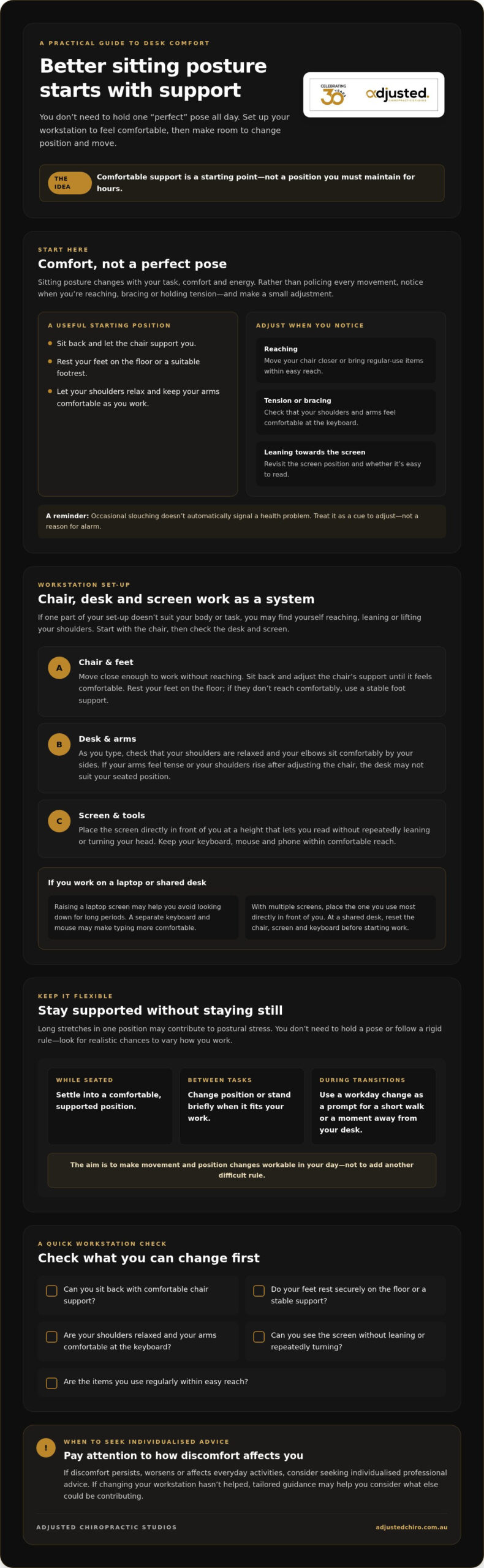
Start by settling into the chair rather than perching at its edge. Let the chair support you, rest your feet comfortably on the floor or a suitable footrest, and allow your shoulders to relax. Your arms should feel comfortable as you work, not held tensely or stretched towards your keyboard.
Then adjust for the task. Reading on screen, typing and taking a phone call may each prompt a different position. Notice whether you’re reaching, bracing or holding tension, and make a small change that helps you feel supported. There’s no single set of angles that suits every body, workstation and activity.
Why does sitting posture change during the day?
Concentration can draw you towards a screen; fatigue may make you lean back or slump; and switching from typing to reading can change how you use your chair and desk. These everyday shifts are normal. Occasional slouching doesn’t automatically signal a health problem. Noticing it is a cue to adjust, not a reason for alarm.
Staying in one position for a long stretch may contribute to postural stress, the strain associated with sustained or uncomfortable positioning. The aim isn’t to police every movement. Find a position that feels manageable, then allow yourself to change it. The idea of Active sitting also reflects this principle: sitting can allow movement rather than requiring you to stay fixed.
If you’re considering how to improve posture while sitting, begin with comfort and support, then respond to what your body and task need. This gives you a practical foundation for checking your chair, desk and screen.
How your chair, desk and screen affect posture while sitting
Your chair, desk and screen work as a system. If one is poorly positioned for your body, you may find yourself reaching, leaning or lifting your shoulders to manage everyday tasks. Start with changes you can make straight away, then consider whether the furniture or equipment itself needs attention.
Adjust your chair and desk for a supported position
Move your chair close enough to the desk to work without reaching, then sit back and adjust the chair’s support until it feels comfortable. Rest your feet on the floor. If they don’t reach comfortably, a stable foot support can help. As you type, check that your shoulders feel relaxed and your elbows sit comfortably by your sides, rather than being pushed up by a desk that’s too high.
Try adjusting the chair first. If the desk height still makes your arms tense or your shoulders rise, the desk may not suit your seated position. You may need a different workstation arrangement or equipment, rather than repeatedly trying to hold yourself in place.
Position your screen and everyday work tools
Place the screen directly in front of you, at a height that lets you read without repeatedly leaning towards it or turning your head. Keep frequently used items, such as your keyboard, mouse and phone, within comfortable reach. The Guide to Good Posture from MedlinePlus offers further general guidance on sitting and workstation setup.
For laptop work, raising the screen may help you avoid looking down for long periods. Pair it with a separate keyboard and mouse if that makes typing more comfortable. With multiple screens, position the one you use most directly in front of you. At a shared desk, take a moment to reset the chair, screen and keyboard before starting work.
Quick workstation check:
- Can you sit back with comfortable chair support?
- Do your feet rest securely on the floor or a stable support?
- Are your shoulders relaxed and your arms comfortable at the keyboard?
- Can you see your screen without leaning or repeatedly turning?
- Are regular-use items within easy reach?
Make the low-effort changes first, then note what still feels awkward. If discomfort continues despite adjusting your setup, individualised guidance may help you consider factors beyond the workstation. You can read about adult chiropractic care as one option for discussing ongoing spinal or musculoskeletal concerns.
Sitting posture tips compared: stay supported without staying still
Posture advice can sound contradictory: sit upright, relax, keep still, move more. A practical approach brings these ideas together. Use a comfortable, supported position for the task in front of you, then change position when it feels useful. The aim isn’t to maintain a posture perfectly, but to make your working day feel manageable.
Is there one correct posture for sitting all day?
No single fixed sitting position is ideal for everyone. Body shape, comfort and the task at hand all influence what feels workable. A position that suits focused typing may not feel right for reading or a phone call. Rather than repeatedly correcting yourself into one prescribed pose, use support as a starting point and allow natural position changes.
This makes advice on how to improve posture while sitting easier to apply: notice when you feel tense, unsupported or ready to move, then adjust. No one posture guarantees you’ll avoid discomfort, and occasional slouching doesn’t mean you’ve failed.
Each option has a role. Choose according to your comfort and what your work requires:
| Option | When it may suit | What to keep in mind |
|---|---|---|
| Sitting | Tasks that need keyboard or screen access | Stay supported, and change position if you become uncomfortable or stiff. |
| Standing briefly | A call, short reading task or pause between seated tasks | Standing is another position, not a requirement to remain still. |
| Moving between tasks | Natural breaks, such as getting water or walking to speak with a colleague | Use the transition to change position rather than rushing back to the same pose. |
Should you use a sit-stand desk or another chair?
Not necessarily. A sit-stand desk is one way to vary your working position, but it isn’t essential or an automatic answer to discomfort. First consider whether small changes to your current setup or the way you use it make work more comfortable. If your chair doesn’t support you or the desk makes your arms awkward to position, different furniture or equipment may be worth considering.
Let comfort and task needs guide your choice. You might sit for detailed screen work, stand briefly for a call, then move between tasks. If standing makes a task less comfortable, return to sitting or try another position. A useful setup gives you options; it doesn’t require a rigid schedule or posture perfection.
How to build posture-friendly movement into your sitting day
Movement breaks don’t need to be a separate workout or disrupt a busy schedule. Short, comfortable changes can help break up long periods at your desk. The best routine is one you can adapt to your work, mobility and access needs, rather than a strict schedule that adds pressure.
Simple ways to remember to change position
Pair a change of position with something you already do. After a call, stand briefly; when you get a drink, take a short walk; or use a task change as a cue to shift your position. Calendar or device reminders can help if you tend to lose track of time, but treat them as optional prompts. Adjust or ignore them when a task needs your attention.
Try this simple routine when you’ve been sitting for a while:
- Pause: Notice whether you feel tense, stiff or settled in one position.
- Change position: Stand, sit back differently or shift your weight comfortably.
- Move gently: Walk for a short time, or try an easy movement at your desk.
- Return to the task: Choose the position that feels supported for what you’re doing next.
What can you do at your desk?
If getting up isn’t practical at that moment, try a few gentle movements while seated. Let your shoulders relax, then roll them comfortably. You could gently turn your upper body within a comfortable range, or move your ankles by pointing and flexing your feet. These are simple ways to vary your position, not treatment exercises. Skip any movement that doesn’t suit you.
Keep the movements easy and controlled. Stop if one causes sharp or worsening symptoms, and don’t force a stretch. If movement is difficult or your work setup limits your options, choose another comfortable way to change position, or seek individualised advice.
Employers looking for broader workplace guidance can read this resource on a Sydney workplace injury prevention programme.
If discomfort continues to affect your working day, consider discussing your concerns through adult chiropractic care. Individualised guidance can help you assess your needs alongside general advice on how to improve posture while sitting.
When sitting discomfort needs more than posture adjustments
Changing your chair position or taking movement breaks can make work more comfortable, but general posture advice can’t identify what’s causing an individual’s symptoms. Discomfort may have more than one contributing factor, so don’t assume posture alone is responsible. If adjustments to your setup haven’t helped, that doesn’t mean you’ve done anything wrong. It may simply be time to seek advice tailored to you.
When should you seek individual advice?
Consider speaking with a qualified health professional if discomfort persists, worsens or affects your ability to work, sleep or manage everyday activities. Seek prompt medical attention for symptoms that are concerning or rapidly worsening. You don’t need to diagnose the problem yourself or keep trying posture changes if they aren’t helping.
Before seeking advice, it may help to note when the discomfort started, what activities affect it and how it changes during the day. These observations can help you explain what you’re experiencing, but they don’t replace an individual assessment. General guidance on how to improve posture while sitting can offer a useful starting point, not a diagnosis or a complete answer to persistent symptoms.
How personalised chiropractic care may fit into the next step
An individual assessment should begin with listening. A practitioner may ask about your symptoms, relevant health history, daily activities and what you’d like to do more comfortably. This context helps inform whether chiropractic care may be appropriate, or whether another kind of health advice is needed. Chiropractic care isn’t necessary for everyone with sitting discomfort, and any next steps should reflect your circumstances and preferences.
Adjusted Chiropractic Studios provides personalised adult chiropractic care in Sydney CBD, including spinal adjustments and Core Score scanning during the assessment phase. If you’d like to understand what an assessment may involve, read about adult chiropractic care in Sydney CBD.
You don’t have to work it out alone. If you have questions or would like to discuss whether an individual conversation may suit your needs, you’re welcome to contact Adjusted Chiropractic Studios.
Make comfortable movement part of your workday
Knowing how to improve posture while sitting isn’t about holding one ideal pose. A supportive chair, desk and screen can make work feel more comfortable, while changing position and adding gentle movement helps you avoid staying fixed for long stretches.
Start with manageable workstation adjustments and use everyday task changes as reminders to move. If discomfort persists, worsens or interferes with daily activities, general posture tips may not be enough. Individual advice can help you understand what may be contributing and decide on a suitable next step.
Adjusted Chiropractic Studios has supported the Sydney CBD community for over 30 years, offering personalised chiropractic care and evidence-based techniques. If you’d like to learn more, explore personalised chiropractic care.
Small, consistent changes can help you build a workday that feels more comfortable and adaptable. Start with what feels achievable for you.
Frequently Asked Questions
How can I improve my posture while sitting at a desk?
Start by adjusting your workstation so you can sit comfortably without reaching or holding tension. Settle back in your chair, rest your feet on the floor or a suitable support, and position your keyboard and screen within easy reach. To improve posture while sitting, also change position regularly rather than trying to maintain one pose all day. If discomfort continues despite these adjustments, seek individual advice.
What is the best sitting posture for working at a computer?
There isn’t one perfect position for everyone. Aim for a relaxed, supported posture that lets you use your computer without repeatedly leaning towards the screen, turning your head or tensing your shoulders. Rest your feet comfortably, keep frequently used items within reach and adjust the setup to suit your body and task. Treat this as a useful starting point, then shift position as your comfort or work changes.
Can sitting posture cause back or neck discomfort?
Sustained or uncomfortable positioning may contribute to postural stress and discomfort, but posture isn’t necessarily the only cause. Work tasks, workstation setup and individual factors may also be relevant. A slouched position now and then doesn’t automatically mean you have a health problem. Try adjusting your setup and changing position, but seek personalised advice if discomfort persists, worsens or affects your usual activities.
How often should I take a break from sitting?
Try to break up long periods of sitting with regular changes in position or brief movement. Safe Work Australia guidance identifies sitting for longer than 30 minutes without a break as a risk, so you could use that as a prompt to review your routine, not a strict rule for every situation. Stand, walk briefly or change position when a natural task transition allows. Adapt reminders to your work and access needs.
Is a standing desk better for posture than sitting?
Not automatically. A sit-stand desk can give you another way to vary your working position, but it isn’t essential and doesn’t suit every task or person. Sitting can be comfortable when your workstation supports you; standing can be useful for some activities. Rather than treating either position as best, pay attention to comfort, task demands and opportunities to move or change position during your workday.
Can a chair correct poor posture?
A supportive chair can make it easier to sit comfortably, but it can’t guarantee a particular posture or correct every cause of discomfort. Adjust its support to suit your body, and check whether your feet rest comfortably and your arms feel relaxed at the keyboard. If the chair still leaves you reaching, bracing or feeling unsupported, the desk or overall setup may also need attention. Regular position changes remain useful.
When should I seek help for discomfort while sitting?
Seek individual advice if discomfort persists, worsens or interferes with work or everyday movement. General posture guidance can’t identify the cause of your symptoms. A qualified health professional can discuss when symptoms occur, your health history and your goals, then advise on suitable next steps. Seek prompt medical attention for concerning or rapidly worsening symptoms. In Sydney CBD, Adjusted Chiropractic Studios provides personalised adult chiropractic care, though chiropractic isn’t necessary for everyone.