
Preventing back pain at work starts with regular movement: get up and move around about every 30 minutes, and adjust your desk setup so your back, neck and shoulders feel supported. Rather than holding one posture all day, make small changes to how you sit, stand and move.
Long hours at a desk can leave your back stiff and shoulders tense, even when you’re focused on a busy day. Practical workplace habits can help reduce strain and make movement part of your routine without major changes to your workday.
This guide explains how movement breaks, alternating between sitting and standing, desk stretches and regular exercise can support preventing back pain at work. You’ll also find practical ways to position your screen and chair, plus guidance on when ongoing discomfort may benefit from an individual assessment. Start with one manageable adjustment, then build a routine that suits your work and your body.
Key Takeaways
- Set up your chair, screen and keyboard to support a comfortable, neutral posture.
- Build brief movement breaks into desk-based work to reduce long periods of stillness.
- Alternate between sitting and standing rather than staying in one position for too long.
- Try gentle neck and shoulder stretches at your desk, moving within a comfortable range.
- Include regular walking and strengthening activities to support your back and core.
1. How Can I Prevent Back And Shoulder Pain At Work?
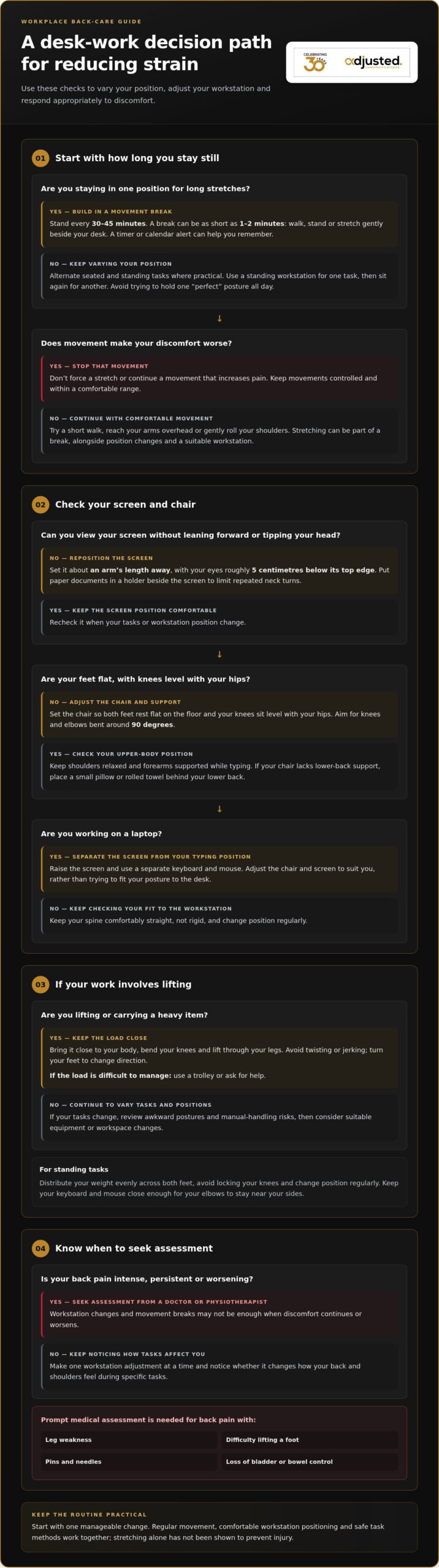
Preventing back pain at work begins with adjusting your posture, workstation and movement habits. A monitor at eye level, supported lower back and brief changes of position can reduce sustained strain during desk-based tasks.
Set your screen about an arm’s length away, with your eyes roughly 5 centimetres below its top edge. This helps you view the display without repeatedly leaning forward or tipping your head. If you use paper documents, place a document holder beside the screen to limit repeated neck turns.
Adjust your chair so both feet rest flat on the floor and your knees sit level with your hips. Aim for knees and elbows bent around 90 degrees, with shoulders relaxed and forearms supported while typing. If the chair lacks lumbar support, place a small pillow or rolled towel behind your lower back. Keep your spine comfortably straight, rather than forcing a rigid posture.
When standing, distribute your weight evenly across both feet and avoid locking your knees. Change position regularly rather than trying to hold one “perfect” posture all day. For example, use a standing workstation for one task, then sit again when you need a different working position.
In Australian workplaces, a practical WHS approach is to identify tasks, awkward postures and manual-handling risks, then adapt equipment or the workspace to reduce strain. Employers can consider workstation changes, safer task methods and suitable lifting aids for heavier objects.
To lift and carry heavy items, bring the load close to your body, bend your knees and lift through your legs. Avoid twisting or jerking. Turn your feet to change direction, and use a trolley or ask for help if the load is difficult to manage.
For office and remote work, adjust the chair, screen and keyboard to suit the person, not just the desk. Laptop users can raise the screen and use a separate keyboard and mouse. If a supportive chair isn’t available, a lumbar roll may help, with feet kept firmly on the floor.
Seek assessment from a doctor or physiotherapist if back pain is intense, persistent or worsening. Back pain with leg weakness, difficulty lifting a foot, pins and needles, or loss of bladder or bowel control needs prompt medical assessment.
Make one workstation adjustment at a time, then notice whether it changes how your back and shoulders feel during specific tasks. For example, raise a low screen before changing other parts of your setup.
A supportive chair or lumbar roll, an adjustable workstation and monitor, a document holder, a separate keyboard and mouse, and suitable lifting aids such as a trolley may help reduce strain. Reviewing tasks, awkward postures and manual-handling risks can guide equipment and workstation changes.
2. Regular movement breaks
Desk work can hold your back, hips and shoulder muscles in one position for long stretches. Set a reminder to stand every 30 to 45 minutes, then take a short walk, refill your water or stretch beside your desk. These brief breaks interrupt prolonged sitting and give your body a chance to move before stiffness builds. Choose a routine that fits your tasks, such as walking while listening to a phone update.
A movement break can be as short as 1-2 minutes. Stand, walk around the office or complete a few comfortable squats, keeping the movements controlled. If you work remotely, walk to another room or step outside briefly. For a busy day of video calls, stand between meetings and move your shoulders gently rather than waiting for a long lunch break.
Make breaks active, not another chance to stay still. Walk over to speak with a colleague, take the stairs where appropriate, or alternate a seated task with a standing one. If a task requires concentration, reach a natural stopping point, then move before starting the next task. A timer or calendar alert can help you remember breaks during back-to-back work.
Stretching can be part of a break, but keep movements comfortable and controlled. Reach your arms overhead, gently roll your shoulders or walk briefly to change how your muscles are working. Stretching may help reduce back pain, but it has not been shown to prevent injury on its own. Pair it with position changes, a suitable workstation and safe task methods.
Notice how your symptoms respond to movement. If your back feels stiff after a long report, try a brief walk and see whether changing position helps. Stop any movement that increases pain, and don’t force a stretch. Work tasks differ: a desk worker may need frequent standing, while someone handling loads may benefit from task rotation and recovery breaks.
Breaks work alongside habits outside the workplace. Make time for gentle activity after work and keep a regular sleep routine. Most adults need seven to nine hours of sleep per night. A short evening walk or relaxed stretch can help you transition from a demanding day. If back pain affects your sleep or daily activities, seek appropriate clinical advice rather than relying on workplace breaks alone.
Start with one practical change: set a recurring reminder for a brief movement break, then adapt it to your work pattern. Regular, active pauses make movement part of the day instead of an occasional response to discomfort.
3. Alternating between sitting and standing
Alternating between sitting and standing helps prevent one workstation position from dominating your day. Treat a sit-to-stand desk as a way to vary tasks, not a reason to stand continuously. For example, stand while reading a short report, then sit for detailed keyboard work. Notice whether each position feels comfortable and adjust your workstation as your tasks change.
A standing desk should let you work without leaning forward or reaching. Keep the keyboard and mouse close enough for your elbows to stay near your sides, and position the screen so you can look ahead comfortably. If the desk adjusts, change its height when you change position. Keep frequently used objects within easy reach to avoid repeated twisting or stretching.
An adjustable chair is useful even when you have a standing workstation. Set its height so your feet rest on the floor, then use the backrest for support during seated tasks. An adjustable seat or backrest can help you find a position suited to your body. Don’t assume one chair setting will suit every task.
Change positions for a specific task rather than waiting for discomfort. You might stand during an audio call, then sit to type notes. During a longer call, walk around if the task allows and you can stay focused. This changes the demands on your muscles and makes active work part of the day.
In a home office, assess the whole workstation before buying equipment. Check whether the desk allows comfortable keyboard use in both positions, whether the screen can be raised, and whether cables or clutter restrict movement. An ergonomic assessment can identify which adjustments matter most for your tasks, posture and available space. It can also help you decide whether to change equipment or rearrange what you already have.
Useful options include an adjustable chair with lumbar support, a desk suited to seated and standing work, and a screen riser where needed. The right choice depends on your workstation and the adjustments required, so an assessment can help set priorities before you choose equipment.
Build position changes into your normal work routine. Alternate seated and standing tasks, then note which setups make you lean forward or feel uncomfortable. If back pain continues or becomes chronic, meaning it lasts three months or longer, speak with a doctor or physiotherapist about assessment and suitable next steps.
4. Desk-based neck and shoulder stretches
After a long period at a computer, try a gentle trapezius stretch to ease tension around your neck and shoulders. Sit upright, let your shoulders relax, then tilt one ear towards the same-side shoulder. Keep the opposite shoulder lowered without pulling your head. Hold the stretch briefly on each side, breathing comfortably. Stop if the movement causes pain, tingling or dizziness.
To move your shoulders, slowly roll them backwards, then forwards, keeping the circles small and controlled. Next, clasp your hands in front of you and reach gently forward, allowing your upper back to round. These simple movements need no equipment and can be done beside your desk or during a short break.
To ease upper-back stiffness, sit with your feet supported and place your hands lightly behind your head. Draw your elbows back without arching your lower back, then relax. Keep your gaze level and don’t force the movement. If you have a neck or shoulder injury, choose movements that suit your comfort and any clinical advice you’ve received.
Make stretching part of a workday break rather than a substitute for moving. Set aside at least 2 minutes to stretch, walk around or change position. For example, after finishing a report, stand, roll your shoulders and take a short walk before starting another task. Stretching may help reduce back pain, but evidence does not show that stretching alone prevents workplace injury.
Yoga can combine gentle movement with breathing and body awareness. A brief standing side reach or comfortable seated twist may suit an office break, provided you move slowly and don’t push into discomfort. In a manual role, use a quiet moment to loosen your shoulders after repetitive tasks, then return to work with controlled movements.
Keep stretches comfortable, especially if you already have symptoms. A movement should feel gentle, not sharp or forceful. Reduce the range or stop if pain increases, or if numbness, pins and needles or weakness develops. Repeated discomfort during a particular task can also be a reason to review that task and your workstation position.
Stretching can support recovery as part of a broader routine. Combine it with regular movement, adequate rest and changes to tasks that keep your body in one position. If neck, shoulder or back symptoms persist or interfere with work, seek an individual assessment to understand what may be contributing and which movements are appropriate.
5. Exercise for spine and core health
Regular exercise helps you build strength for daily tasks, including sitting, carrying and lifting. The NHS advises adults to do strengthening activities that work the major muscle groups, including the back, at least 2 days weekly. Choose movements you can perform with control, then increase the challenge gradually as your capacity develops.
A practical routine can combine walking, gentle stretching, yoga or core exercises. Add 10 to 15 minutes of one or more activities to your routine, choosing options that fit your current fitness and comfort. A brisk walk after work, for example, adds movement without needing gym equipment. Exercise should feel manageable, not like a test of how much discomfort you can tolerate.
Try a glute bridge on a clear floor space. Lie on your back with knees bent and feet flat, then tighten your abdomen gently and lift your hips. Keep your shoulders on the floor and avoid arching your back. Hold the bridge for 20 seconds, lower with control and repeat 10-15 times. Stop if it causes pain.
A bird dog exercise can train controlled trunk and hip movement. Start on hands and knees, then extend one arm and the opposite leg without letting your back sag or rotate. Hold each position briefly, return to the start and change sides. Complete 10-15 repetitions per side, keeping the movement steady rather than reaching as far as possible.
Supermans are another floor-based option, but keep the lift small and comfortable. Lie face down, extend your arms and legs, then lift them gently while keeping your neck relaxed. The suggested routine is 20 repetitions in 3 sets. If this position irritates your back, skip it and choose a more comfortable exercise instead.
For a workplace movement break, try a short walk, several controlled sit-to-stands or gentle trunk movements beside your desk. These can add activity between tasks, while separate strength sessions train muscles more deliberately. Stretching may help ease stiffness, but it should complement, not replace, strength and aerobic exercise.
If back symptoms affect lifting, walking or your work routine, a clinic assessment can help guide exercise choices to your needs. An Adult Chiropractic assessment can include discussion of your health history and movement goals. Explore Adult Chiropractic support for an individualised approach to spinal and musculoskeletal concerns.
Adjusted Chiropractic Studios: Adult Chiropractic
Adjusted Chiropractic Studios provides Adult Chiropractic in Sydney CBD for people whose back or shoulder discomfort persists despite changes to their work habits. An assessment can consider your health history, symptoms, movement and work demands to shape care around your needs and goals.
Where appropriate, care may include Spinal Adjustments and practical guidance to support spinal health beyond your appointment. Core Score Testing is also available as part of the studio’s assessment options. If discomfort affects your work, movement or daily routine, an individual discussion can help clarify useful next steps.
To discuss your concerns, contact Adjusted Chiropractic Studios or visit adjustedchiro.com.au.
Build a workday your body can manage
Lasting change often starts with noticing which parts of your workday leave you tense, restricted or uncomfortable. Use that insight to shape habits and support that fit your tasks, rather than expecting one adjustment to suit every day. A steady, personalised approach to preventing back pain at work can help you make practical choices for your movement and wellbeing.
If discomfort keeps returning or affects how you function, Adjusted Chiropractic Studios offers Adult Chiropractic, Spinal Adjustments and Core Score Testing. These options can be part of an individual assessment and care plan guided by your health history, symptoms and goals. Your next step can be a conversation about what you’re experiencing and what support may suit you.
Contact Adjusted Chiropractic Studios to discuss your spinal health. A thoughtful plan can help you move towards greater comfort and confidence at work.
Frequently Asked Questions
How Can I Prevent Back And Shoulder Pain At Work?
Start by noticing which work tasks bring on discomfort instead of changing everything at once. Keep a brief record of the task, what you were doing and whether symptoms eased after stopping. For example, note whether discomfort follows a long typing task or repeated reaching. This can help you and your workplace identify a specific change to try and assess whether it makes the task more manageable.
How Can You Keep Your Back Healthy Over Time?
Build a routine you can maintain on workdays and days off. Choose activities you enjoy, such as walking or strength exercises, and make them part of everyday life rather than an occasional response to stiffness. Notice how daily tasks feel, such as carrying groceries or gardening. If symptoms start limiting those activities or keep returning, discuss the pattern with a health professional.
Which professionals are most at risk?
Workplace back-injury risk is linked to physical demands, not simply a job title. Manual work can raise the risk, particularly when tasks involve lifting, carrying or awkward postures. A role can also combine physical demands with long periods in one position. Employers and workers can identify the tasks, loads and work methods that create strain, then consider practical ways to reduce those demands.
Why Do My Shoulders And Upper Back Hurt At Work?
Shoulders and upper-back muscles can become uncomfortable when work repeatedly holds them in one position or involves reaching, pulling or supporting the arms. Extended mouse use or repeated overhead reaching, for example, may load the same areas. Consider whether symptoms occur during a particular task, on one side or after a change in duties. This information can help guide a more relevant assessment.
What causes back pain at work and which jobs have the highest risk in Australia?
Back pain at work can be associated with manual tasks, repeated handling, awkward postures or sustained positions. A 2024 national health survey found that 47% of Australian tradies reported back pain in the previous year. That figure describes tradies; it does not establish a ranking across occupations. The demands of a particular role and how tasks are carried out matter when considering workplace risk.
What is the correct sitting posture and ergonomic desk setup to prevent back pain?
There is no single sitting position that suits every person and task all day. Aim for a supported position that lets you work without persistent reaching, twisting or leaning. Try a typical task, such as reading a document while taking notes, and notice whether you repeatedly turn or stretch to reach what you need.
How should an office chair, desk, monitor and keyboard be adjusted to reduce back strain?
Adjustments should suit both the worker and the task. Consider whether the chair supports you during your usual work, whether the desk allows comfortable keyboard use, and whether you can view the screen without repeated neck movement. Test the setup while doing a normal task, then change the part causing the clearest difficulty instead of adjusting several things at once.
How often should you take movement breaks when sitting at work?
Take brief movement breaks regularly during desk work instead of leaving all movement until the end of the day. Link a short walk or change of task to natural pauses, such as finishing a call or sending a report. If you often miss breaks during busy periods, use a reminder or agree on shared prompts with your team to make movement easier to maintain.